The ESP32 is one of the best boards to learn on. It packs Wi-Fi, Bluetooth, and real processing power onto a small, affordable board — which makes it perfect for ESP32 projects for beginners that are actually useful, not just blinking an LED.
This guide gives you five ESP32 projects you can build this semester, from a WiFi weather station to a Bluetooth robot car. Each one teaches a different skill and shows off a different side of the board.
For every project you'll see what it does, the parts you need, and how hard it is — so you can pick one and start today.
Here are the five, from the easiest to the most fun:
- WiFi Weather Station — read temperature and humidity and show them on a web page.
- Web-Controlled Home Automation — switch a light or appliance from your phone's browser.
- Bluetooth Robot Car — drive a small car from your phone over Bluetooth.
- Touchscreen Control Panel — build a tap-to-control screen on an all-in-one ESP32 display.
- Internet Clock — show the exact time, pulled from the internet, on a small display.
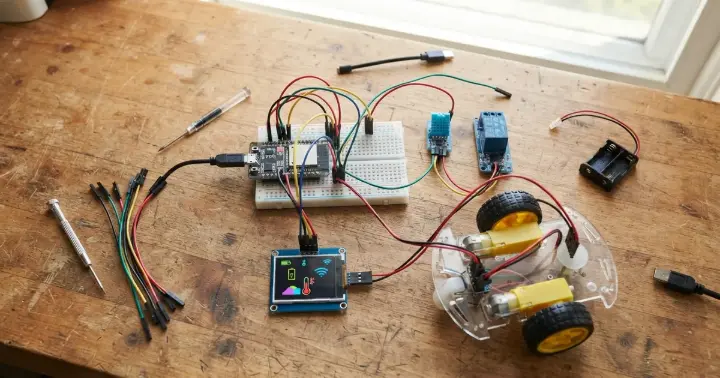
What You Need to Start
Every project here runs on the same core kit:
- An ESP32 development board — any of the boards covered later will work.
- A breadboard and a set of jumper wires for quick, solder-free wiring.
- The Arduino IDE on your computer, set up for the ESP32.
Each project then adds one or two extra parts, listed with it.
1. WiFi Weather Station
Your first real IoT project. The ESP32 reads the temperature and humidity in the room, then serves a small web page you can open from any phone or laptop on the same Wi-Fi.
It's the clearest way to learn two core skills at once: reading a sensor and running a web server on the board.
What you need: an ESP32 board and a DHT11 temperature and humidity sensor. For more accurate readings, step up to the DHT22 (AM2302) sensor. You can also show the values on a 16×2 I2C LCD instead of, or alongside, the web page.
Take it further: add a second sensor, or log the readings over time to spot trends.
Level: beginner.
2. Web-Controlled Home Automation
Turn the ESP32 into a mini smart-home controller. A web page served by the board gives you an on/off button that switches a light or appliance through a relay.
This is the project that makes IoT "click" — you press a button in your browser, and something in the real world turns on.
What you need: an ESP32 board and a 5V relay module. Start by switching an LED, then move up to the relay once the code works.
Take it further: add a timer so the light switches itself off, or control several outputs from one page.
Safety first: practise with low-voltage loads like an LED or a small fan. Mains wiring should only be handled with proper knowledge and care.
Level: beginner to intermediate.
3. Bluetooth Robot Car
Now put the ESP32's Bluetooth to work. Pair the board with your phone, send simple commands — forward, back, left, right — and drive a small car in real time.
You'll learn how to receive Bluetooth commands and turn them into motor movement.
What you need: an ESP32 board and an L298N motor driver, plus two DC gear motors with wheels, a chassis, and a battery pack. The L298N takes the ESP32's low-power signals and uses them to drive the motors.
Take it further: add a distance sensor so the car stops before it hits a wall.
Level: intermediate.
4. Touchscreen Control Panel
Swap the buttons and the serial monitor for a real screen. Using an all-in-one ESP32 board with a built-in touch display, you can build a tap-to-control panel that runs on its own, with no computer attached.
It's the natural next step once you're comfortable with the projects above.
What you need: an ESP32 2.8" TFT touchscreen board. We have a full, step-by-step build you can follow here: Building a Standalone Touchscreen Project with the ESP32 2.8" Display.
Level: intermediate.
5. Internet Clock
A clock that never needs setting. The ESP32 connects to Wi-Fi, pulls the exact time from an internet time server (NTP), and shows it on a display.
It's a short, satisfying project that teaches you how to get your board online and use live data from the internet.
What you need: an ESP32 board and a display — a 16×2 I2C LCD is the simplest option.
Take it further: add the date, or show a second time zone for a friend studying abroad.
Level: beginner.
Which ESP32 Board Should You Choose?
All five projects run on any standard ESP32 board. The differences are size and the number of pins, not whether a project will work.
- The ESP32-S 30-pin board is the classic all-rounder — plenty of pins for sensors, motors, and displays.
- The ESP32-C3 Super Mini is tiny and low-cost, great for small builds like the weather station or the clock.
- The ESP32 DevKitC (WROOM-32D, 16MB) gives you extra memory for bigger programs.
If you are buying your first board, the 30-pin board is the easiest to wire on a breadboard.
Tips to Finish Your First Build
A few simple habits make the difference between a project that works and one that sits half-finished:
- Start small. Get the sensor or motor working on its own before adding Wi-Fi, a screen, or a web page.
- Use a breadboard first. Wire everything solder-free so you can fix mistakes in seconds.
- Mind the power. Motors and relays can draw more current than a USB port likes to give, so use a separate supply when needed.
- Borrow working code. Begin with a tested example sketch, get it running, then change one thing at a time.
Frequently Asked Questions
Is the ESP32 good for beginners?
Yes. It uses the same Arduino IDE many beginners already know, and its built-in Wi-Fi and Bluetooth let you build connected projects without buying extra modules.
Do I need to know coding to build these projects?
A little. All five use the Arduino IDE with C/C++, and there are free example sketches for every one of them, so you can start by editing working code rather than writing it from scratch.
Is the ESP32 better than Arduino for these projects?
For anything that connects to Wi-Fi or Bluetooth, yes — the ESP32 has both built in, while a basic Arduino needs add-on modules. For simple offline projects, either board works.
Which ESP32 board should I buy first?
The ESP32-S 30-pin board is the easiest first choice: it has plenty of pins and sits neatly on a breadboard. The C3 Super Mini is a good pick when size matters.
What can you build with an ESP32?
Almost any connected project — weather stations, home automation, robots, touchscreens, clocks, and data loggers. The five here are a starting point, not the limit.
Start Building This Semester
The best way to learn electronics is to build something that actually works, and any of these five projects will get you there.
Pick the one that excites you most, gather the parts, and give yourself a weekend.
Ready to start? Browse our full range of ESP32 & ESP8266 boards at RAM Electronics and choose the board for your first project.