Short answer: the Raspberry Pi 5 8GB is the right pick if your project runs containers, a home server, development tools, or small AI models. If you only browse, learn, or run one light service, the 4GB board is usually enough.
This Raspberry Pi 5 8GB vs 4GB guide helps you decide in a few minutes.
It also lists everything you need to buy alongside the board, so your first boot doesn't stall on a missing cable.
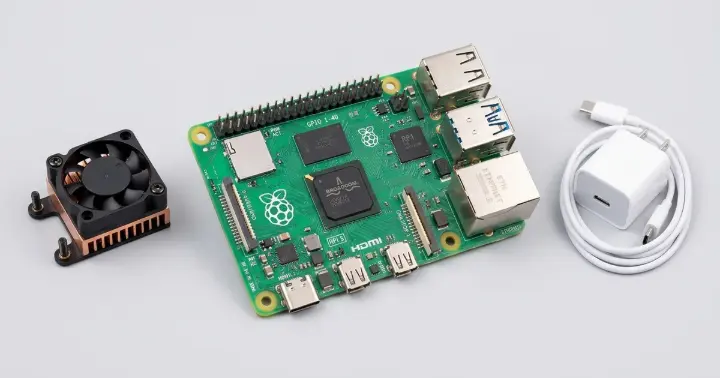
Raspberry Pi 5 8GB vs 4GB vs 16GB: The Short Answer
- Choose the 4GB if you use the Pi as a basic desktop, a learning board, or for one or two light services.
- Choose the 8GB if you run several services side by side, use containers, compile code, or want room for small AI models.
- Choose the 16GB only if you already know a workload will fill 8GB, such as many virtual machines or very large jobs held in memory.
All three versions use the same Broadcom BCM2712 processor and the same ports. The only difference is how much memory the board has.
That means the 8GB doesn't compute faster than the 4GB. It simply runs out of memory later.
RAM Electronics carries all three sizes:
Choose Your Raspberry Pi 5 RAM Size by Workload
Use this as a rule of thumb. It reflects the general guidance shared across the Raspberry Pi community.
- Desktop and browsing: 4GB handles everyday use. Choose 8GB if you keep many browser tabs open next to development tools.
- Home server, Pi-hole, or NAS: 4GB is enough for one or two services. Choose 8GB once you run several at the same time.
- Home Assistant with many add-ons: 8GB gives you headroom as the setup grows.
- Docker and containers: 8GB is the comfortable choice, because every container takes its own share of memory.
- Software development and compiling: 8GB helps when you build large projects or run heavy tools together.
- Small local AI models: 8GB is the practical minimum most guides recommend. The FAQ below explains what to expect.
- Many virtual machines or very large datasets in memory: consider the 16GB.
Which Raspberry Pi 5 to Buy: A Two-Minute RAM Test
One tip experienced users keep repeating: measure first, then buy.
If you already own a Raspberry Pi, you can check in two minutes:
- Run your usual workload for a normal day.
- Open a terminal and type free -h.
- Look at the swap line. If swap is in regular use, your board has usually outgrown its RAM.
- If most of the memory stays free, a bigger board won't change much.
Raspberry Pi 5 Accessories: What Else You Need to Buy
The board alone won't boot into a desktop. Here is the checklist:
- Power supply. The Pi 5 is designed for a 5V/5A USB-C supply. A Raspberry Pi 4 charger can run the board but may limit the power available to USB accessories. RAM carries the Raspberry Pi 5 27W USB-C Power Supply.
- Cooling. Raspberry Pi says the Pi 5 performs best with active cooling. Choose the Raspberry Pi 5 Complete Active Cooler Set for a fan and heatsink. A case with passive cooling, such as the aluminum Raspberry Pi 5 enclosure, is another route.
- Case. Pi 4 cases generally don't fit the Pi 5, because the board layout changed. Pick one listed for the Pi 5, like the aluminum case above or the ABS red/white Pi 5 case.
- Display cable. The Pi 5 uses micro-HDMI ports, so you need an HDMI to micro-HDMI cable. RAM stocks a 1.8m HDMI to micro-HDMI cable.
- Storage. The board boots from a microSD card and supports high-speed SDR104 mode. For an SSD, you need the board's PCIe interface plus a separate M.2 HAT or adapter, which is not included.
- Optional AI add-on. The Raspberry Pi AI HAT+ 2 brings its own 8GB of onboard memory for generative AI workloads.
Upgrading From a Raspberry Pi 4 8GB: Is the Raspberry Pi 5 8GB Worth It?
Both boards come with 8GB of RAM, so the upgrade isn't about memory size. It's about everything around it.
Here is what changes, based on the specifications on RAM's product pages:
- Processor: a 2.4GHz quad-core Cortex-A76 on the Pi 5, against a 1.5GHz quad-core Cortex-A72 on the Pi 4.
- Memory speed: LPDDR4X-4267 on the Pi 5, against LPDDR4-3200 on the Pi 4.
- Expansion: the Pi 5 has a PCIe 2.0 x1 interface. The Pi 4's specification list has none.
- Camera and display ports: two 4-lane MIPI connectors on the Pi 5, against one 2-lane DSI and one 2-lane CSI port on the Pi 4.
- Extras: the Pi 5 adds a real-time clock (powered from an external battery) and a power button.
- Power: 5V/5A on the Pi 5, against a 3A minimum on the Pi 4.
Raspberry Pi's launch announcement describes about two to three times the CPU and GPU performance of the Pi 4, with roughly double the memory and I/O bandwidth.
If your Raspberry Pi 4B 8GB already does everything you need, there is no urgency. If you are hitting CPU limits or want NVMe storage, the Pi 5 is the upgrade.
Frequently Asked Questions
Is the Raspberry Pi 5 8GB worth it over the 4GB?
It is worth it if you run containers, several services at once, development tools, or small AI models. For browsing, learning, or one light service, the 4GB board is usually enough. Both use the same processor, so the 8GB gives you room, not extra speed.
Do I need the 16GB Raspberry Pi 5 instead?
Only if you already know a workload will fill 8GB, such as many virtual machines or very large jobs held in memory. For most home servers, desktops, and development setups, the 8GB is the more balanced choice.
Is 8GB enough for desktop use on the Raspberry Pi 5?
Yes. Eight gigabytes covers everyday browsing, office work, and development tools running side by side. If you rarely have more than a few tabs and one app open, the 4GB would also cope.
Can the Raspberry Pi 5 8GB run local AI models?
It can run small quantised language models, and 8GB is the practical minimum most guides recommend. Speed varies widely with the model and settings, so treat it as an experiment platform rather than a fast assistant. For heavier AI work, RAM also carries the Raspberry Pi AI HAT+ 2, an add-on board with its own 8GB of onboard memory.
Does the Raspberry Pi 5 need active cooling?
Raspberry Pi says the Pi 5 performs best with active cooling. A fan and heatsink such as the Raspberry Pi 5 Active Cooler Set helps keep performance steady under sustained load. A case with passive cooling is another option.
Can I use my Raspberry Pi 4 power supply or case?
A Raspberry Pi 4 charger can run the board but may limit the power available to USB accessories, so a 5V/5A supply is the better match. Pi 4 cases generally do not fit the Pi 5 because the board layout changed, so choose a case listed for the Pi 5.
Can I use an NVMe SSD with the Raspberry Pi 5?
Yes, through the board's PCIe 2.0 x1 interface. You need a separate M.2 HAT or adapter, because the board does not include one. Without it, the board boots from a microSD card.
Pick Your Raspberry Pi 5 8GB Setup This Semester
Whether you are building a home lab, a study-season project, or a small server this semester, the Raspberry Pi 5 8GB gives you room to grow without moving up to 16GB.
A simple order of operations:
- Pick the RAM size that matches your workload.
- Add the power supply, cooling, and case.
- Add the cable, storage, and any AI add-on you need.
You can order the Raspberry Pi 5 8GB from RAM Electronics in Egypt, and browse the rest of the Raspberry Pi boards for the accessories above.