Makey Makey turns a banana into a piano key, a pencil drawing into a game controller, and a cup of water into a switch. That is exactly why it works so well in the classroom — it makes electricity, coding, and the engineering design process something students can touch and play with.
This guide gives you eight Makey Makey classroom projects for STEM, sorted by grade level and whether they need any coding, so you can match the right one to your students and your lesson.
For every project you'll see what it teaches and exactly what you need to run it.
How Makey Makey Works
Makey Makey is an invention kit that plugs into any computer over USB. The computer sees it as an ordinary keyboard and mouse, so it works with any program, website, or game — with no drivers and no software to install.
You clip one wire to a conductive object — a banana, foil, Play-Doh, even a friend's hand — and one wire to "Earth." When a student touches the object, the circuit closes and the computer registers a key press.
That one simple idea is the base for every project below.
What You Need
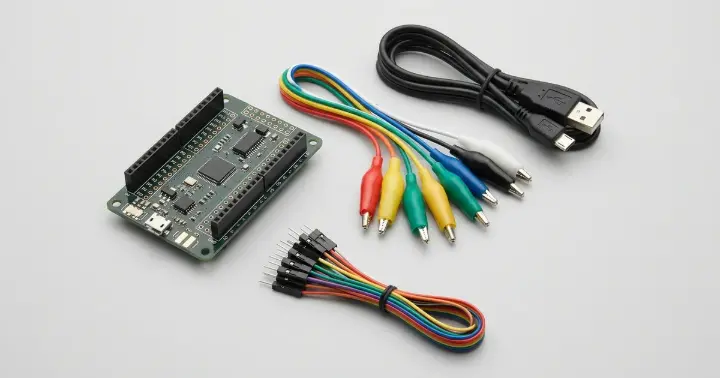
- A Makey Makey invention kit — the board, a USB cable, alligator clips, and connecting wires.
- A computer — Windows, Mac, or Chromebook all work.
- Everyday conductive materials: fruit, Play-Doh, aluminum foil, pencils, and coins.
- Optional: extra jumper wires and alligator clips to connect more students or bigger builds.
No coding is needed to start. A few projects add Scratch once your students are ready.
8 Makey Makey Classroom Projects for STEM
Here is the full set at a glance:
# | Project | Grade | Needs coding? | What it teaches |
1 | Banana Piano | K–12 | No | Conductivity, sound |
2 | Game Controller + Scratch Game | 3–12 | Yes (Scratch) | Coding, game design |
3 | "Is It Conductive?" Tester | K–8 | No | Circuits, scientific method |
4 | Classroom Quiz Buzzer | 2–12 | Optional | Review, teamwork |
5 | Steady-Hand Game | 3–8 | No | Circuits, engineering |
6 | Play-Doh Maze | 3–8 | No | Engineering design |
7 | Interactive Poster | 3–12 | Optional | Any subject, research |
8 | Interactive Story / Blackout Poetry | 4–12 | Yes (Scratch) | Literacy, ELA |
1. Banana Piano
The classic first project. Clip five bananas to the arrow keys and space bar, open the free online piano, and each banana plays a note when touched.
It's the fastest way to get the whole class asking "how does that work?!" — and it leads straight into a discussion about what conducts electricity.
What you need: the kit, five bananas (or any conductive objects), and the free online piano.
2. Build-Your-Own Game Controller (+ Scratch)
Students design a controller from cardboard and foil, then build a simple game in Scratch that it controls.
It links hands-on making with real coding, and every controller comes out different.
What you need: the kit, cardboard, foil, and a free Scratch account.
3. "Is It Conductive?" Tester
Turn the kit into a science tool: touch different materials and see which ones close the circuit and trigger a sound or key press.
Students predict, test, and record — the scientific method in action.
What you need: the kit, and a tray of materials to test (metal, water, fruit, plastic, paper).
4. Classroom Quiz Buzzer
Make foil buzzer pads for each team. The first team to touch their pad triggers a key, so you can run quiz-show reviews for any subject.
It's perfect for revision days, and it works in history, science, or language class.
What you need: the kit and foil pads (a simple Scratch buzzer adds scoring).
5. Steady-Hand Game
The classic "Operation" game: bend a wire into a wobbly path and move a foil loop along it without touching the sides.
Touching the wire closes the circuit and buzzes — a hands-on lesson in circuits and careful engineering.
What you need: the kit, stiff wire, and foil.
6. Play-Doh Maze
Students build a maze with Play-Doh walls. Touching a wall closes the circuit, so the goal is to guide a finger or marker through without setting it off.
It's pure engineering design: plan, build, test, improve.
What you need: the kit and several colors of Play-Doh.
7. Interactive Poster
Add foil or conductive paint behind a poster so touching a picture plays a sound, a fact, or a clip through Scratch.
It turns any research topic — the water cycle, a historical figure, the solar system — into something students touch to explore.
What you need: the kit, a poster, foil or conductive paint, and Scratch for the audio.
8. Interactive Story / Blackout Poetry
Students make a page where touching words or images triggers narration, music, or effects coded in Scratch.
It joins literacy and coding, and works beautifully for blackout poetry and storytelling.
What you need: the kit, printed pages, foil, and Scratch.
Classroom Tips (and Quick Fixes)
A few habits make these projects run smoothly with a full class:
- If nothing happens, check the Earth. The student has to hold or touch the Earth wire to complete the circuit.
- Clips fall off — press firmly. Alligator clips grip best on a clean edge, and a small foil tab helps.
- Fruit gets messy. For repeat classes, switch to foil or Play-Doh to keep things hygienic.
- Keep water away from the board. Water can be a "key," but keep cups clear of the kit and cables.
- Share the load. Pair students so one builds while the other tests — fewer clips, more thinking.
Which Project Should You Start With?
For your first lesson, start with the Banana Piano or the "Is It Conductive?" tester. Both work out of the box, need no coding, and fit any grade.
Once students are hooked, move to a Scratch project like the game controller to bring in real coding.
Frequently Asked Questions
Do students need to know how to code to use Makey Makey?
No. Many projects — the banana piano, the conductivity tester, the steady-hand game — work straight out of the box with no code. Coding comes in only when you add Scratch for games and interactive projects.
What ages or grades is Makey Makey for?
From about kindergarten to grade 12. The same kit scales with the student: younger children explore conductivity and sound, while older students build games and coded projects.
What materials do I need besides the kit?
Everyday conductive things: fruit, Play-Doh, aluminum foil, pencils, and coins. Most projects use what is already in the classroom.
Does Makey Makey work on any computer?
Yes. It plugs in over USB and acts as a keyboard and mouse, so it works on Windows, Mac, and Chromebooks with no drivers or software to install.
What's included in the kit?
The Makey Makey board, a USB cable, alligator clips, and connecting (Dupont) wires — everything you need to start your first project.
Start Inventing in Your Classroom
Makey Makey is one of the easiest ways to bring hands-on STEM into any subject, at any grade, often with no coding at all.
Pick a project, grab some foil and fruit, and let your students discover how everyday objects can talk to a computer.
Ready to start? Get the Makey Makey invention kit and explore more STEM and DIY electronics kits at RAM Electronics.