If you have ever tried to add a touchscreen to a project, you have met two very different kinds of display that look almost identical but work in completely opposite ways.
One is a regular TFT screen, where your microcontroller does all the drawing. The other is a smart HMI display like the 7-inch TOPWAY HKT070DTA-1C, which has its own processor and does the drawing itself — you just send it simple commands.
This guide explains what a smart HMI display is, how it differs from a regular TFT, what you can build with one, and who needs it, so you can decide whether it belongs in your next project.
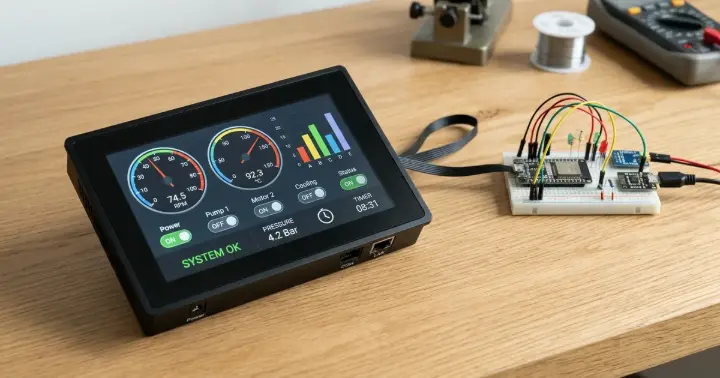
What Is a Smart HMI Display?
HMI stands for Human-Machine Interface — the screen a person uses to control a machine. A smart HMI display is one that carries its own brain.
Inside a module like the TOPWAY HKT070DTA-1C is a 32-bit processor and a graphics engine. It stores your screen designs — buttons, gauges, charts, and text — and draws them on its own. Your main board, whether an Arduino, an ESP32, or a PLC, talks to it over a serial link, sending short commands like "show this value on gauge 1" or asking "was a button pressed?".
So the display handles the look, and your controller handles the logic. They split the work.
Smart HMI vs a Regular TFT
This is the difference that matters, and it comes down to one question: who does the drawing?
With a regular TFT, your microcontroller draws every pixel. It stores the fonts and images, runs a graphics library, and spends its memory and processing time pushing the picture to the screen. On a small board, a complex interface can eat up most of your resources.
A smart HMI display like the HKT070DTA-1C flips this around. The screen draws everything itself, and your controller just sends and receives short messages, which frees it to run your actual project.
Smart HMI display | Regular TFT | |
Who draws the UI | The display itself | Your microcontroller |
Your code | Short serial commands | A full graphics library |
Controller load | Very light | Heavy |
Connection | Serial (UART / RS232) | Parallel or SPI |
Design tool | Visual GUI editor | Code |
Best for | Panels, machines, rich UIs | Simple or custom graphics |
Neither is "better" — they suit different jobs. But when the interface itself is important, the smart display wins easily.
How It Works: You Design, It Draws
The workflow for a smart display is what makes it so productive.
On a module like the HKT070DTA-1C, you build the interface on your computer using the manufacturer's visual editor. You place buttons, gauges, text fields, and background images, give each one an ID, then load that design onto the display over USB.
From then on, your microcontroller only exchanges messages with the screen. To update a reading, it sends a short command naming the element and the new value. When the user taps a button, the display sends a message back. You never write graphics code, and you never redraw the screen by hand.
That is why these displays are so popular for control panels: the hard, slow part — building and rendering a polished interface — is already done for you.
Meet the TOPWAY HKT070DTA-1C 7"
The TOPWAY HKT070DTA-1C is a strong example of an industrial smart HMI display, and it shows why this class of screen is worth it.
It is a 7-inch panel at 800 × 480 resolution with 65K colors and a resistive touchscreen, driven by an onboard 32-bit processor and graphics engine. You control it over a simple serial command link at 115200 baud by default, so your interface runs smoothly without loading your main board.
What sets it apart is that it is built for real-world use, not just the lab bench:
- Bright and clear. A 500 cd/m² screen with a 900:1 contrast ratio stays readable on a busy panel.
- Rugged and sealed. An IP65-rated front bezel shrugs off dust and splashes, and the module runs across a -20 to +70°C temperature range.
- Industrial power. It accepts 11–26V DC (12V typical), matching the supplies already found in machines and control cabinets.
- Comes framed. It ships as a module with a frame, ready to mount into a panel.
In short, it delivers a professional, responsive touchscreen interface in a package tough enough for a workshop or a factory floor. If 7 inches is more than you need, RAM also stocks the smaller 5-inch HKT050ATA-C from the same family.
What You Can Build With It
Because the display does the heavy lifting, a smart HMI panel opens up projects that would be painful to build on a regular TFT. A few things makers and engineers build with a screen like the HKT070DTA-1C:
- A machine control panel. Start and stop controls, live status, and adjustable parameters for a piece of equipment, all on one operator screen.
- An equipment dashboard. Gauges, bar charts, and live numeric readings for temperature, pressure, speed, or power — updated with a single serial command each.
- An automation control screen. A touch interface for a home-automation or industrial-automation controller, driven by an ESP32 or a PLC behind it.
- A test-rig or instrument front panel. A clean, button-driven interface for a custom tool or measurement setup.
- Any project where the screen is the product. When a polished, reliable interface is the whole point, this is the fast way to get there.
In every case, the pattern is the same: you design the screen once, and your controller simply sends values and reads touches.
What to Watch For
A smart HMI display is powerful, but it is not a drop-in replacement for a hobby TFT. A few honest points before you buy.
- Serial levels. Many industrial modules, including the HKT070DTA-1C, use an RS232 serial interface, not the 3.3V/5V TTL that an Arduino or ESP32 speaks directly. You need a simple level converter between them.
- Power. It runs on 11–26V DC (12V typical), not the 5V you might expect, so plan the power supply.
- Touch type. It uses a resistive touch panel, which is accurate with a fingertip or stylus and tolerant of gloves and dust, but not as slick as the capacitive glass on a phone.
- Cost. A smart display costs more than a bare TFT. You are paying for the onboard processor and the development time it saves you.
None of these are dealbreakers — they are simply the trade-offs of an industrial smart panel.
Who Needs a Smart HMI Display?
A smart HMI display earns its place when the interface matters as much as the project itself.
Reach for one when you are building a control panel for a machine, a piece of equipment that needs a professional operator screen, or any project where you want gauges, charts, and buttons without writing graphics code. Machine builders, automation engineers, and students on serious control projects are the typical users, and the rugged build of the HKT070DTA-1C suits workshop and factory settings a bare board cannot handle.
You probably do not need one for a simple project with a few readings, or when you want full custom control of every pixel. For those, a regular Arduino TFT display is cheaper and simpler. And if you want the smart-display workflow at a hobby price and voltage, a hobby-grade serial HMI panel sits between the two.
Frequently Asked Questions
What is a smart HMI display?
It is a touchscreen with its own processor and graphics engine. It stores and draws your interface itself, while your microcontroller just sends and receives short serial commands. That splits the work: the display handles the look, and your board handles the logic.
How is a smart HMI display different from a regular TFT?
With a regular TFT, your microcontroller draws every pixel using a graphics library, which is heavy on its resources. A smart HMI display draws everything itself and only exchanges simple messages with your controller, which frees it up.
Can I connect a smart HMI display to an Arduino or ESP32?
Yes, over a serial link. Just check the voltage levels: modules like the HKT070DTA-1C use RS232, not 3.3V/5V TTL, so you need a level converter between the display and the board.
Do I need to write graphics code for a smart display?
No. You design the interface visually in the manufacturer's editor, load it onto the display, and then send simple commands. The display does all the drawing, so there is no graphics code in your project.
What voltage does the TOPWAY HKT070DTA-1C need?
It runs on 11–26V DC, with 12V typical — higher than the 5V many hobby displays use. Plan a suitable power supply, and remember the RS232 level converter for the serial link.
Is a smart HMI display worth it over a regular TFT?
It is when you need a polished interface quickly, or you are building a control panel or machine. For a simple project or full pixel-level control, a regular TFT is cheaper and simpler.
Choosing the Right Touchscreen for Your Project
A smart HMI display and a regular TFT solve the same need in opposite ways. The regular TFT gives you full control at a low price, if you are willing to write the graphics. The smart display hands you a finished, responsive interface for the cost of a little more money and a serial link.
If your project is a control panel, a machine, or anything where the screen is the product, a smart HMI display saves real time and keeps your controller free for the work that matters — and an industrial module like the HKT070DTA-1C gives you that in a build tough enough for the field.
Ready to build? Get the 7-inch TOPWAY HKT070DTA-1C or its 5-inch sibling, or browse all UART smart TFT displays at RAM Electronics.