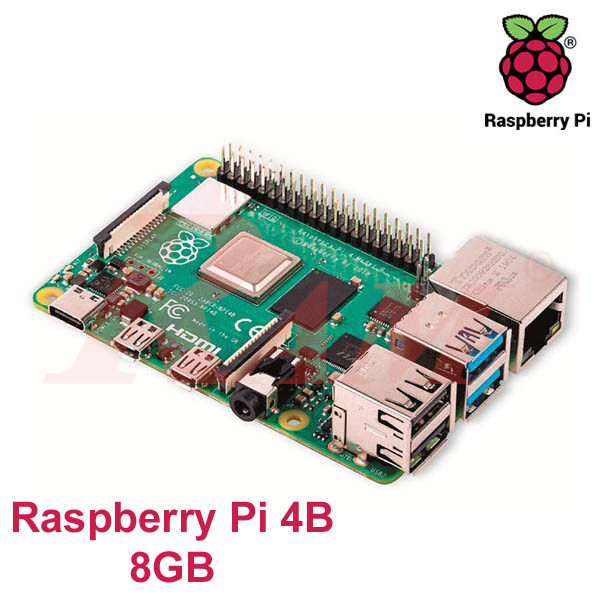

The Raspberry Pi 4B 8GB is the highest-memory option in the Raspberry Pi 4 lineup, built around the same Broadcom BCM2711 quad-core Cortex-A72 CPU as the 2GB and 4GB variants. It's one of RAM Electronics' Raspberry Pi boards, best suited to heavier multitasking, always-on servers, and memory-hungry or edge-AI projects that outgrow the smaller-memory boards.
Features
- Broadcom BCM2711, Quad-core Cortex-A72 (ARM v8) 64-bit SoC @ 1.5GHz
- 8GB LPDDR4-3200 SDRAM
- 2.4 GHz and 5.0 GHz IEEE 802.11ac wireless, Bluetooth 5.0, BLE
- Gigabit Ethernet
- 2 USB 3.0 ports; 2 USB 2.0 ports.
- Raspberry Pi standard 40-pin GPIO header (fully backward compatible with previous boards)
- 2 × micro-HDMI ports (up to 4kp60 supported)
- 2-lane MIPI DSI display port
- 2-lane MIPI CSI camera port
- 4-pole stereo audio and composite video port
- H.265 (4kp60 decode), H264 (1080p60 decode, 1080p30 encode)
- OpenGL ES 3.0 graphics
- Micro-SD card slot for loading operating system and data storage
- 5V DC via USB-C connector (minimum 3A*)
- 5V DC via GPIO header (minimum 3A*)
- Power over Ethernet (PoE) enabled (requires separate PoE HAT)
- Operating temperature: 0 – 50 degrees C ambient
Why Choose the 8GB Model?
- The most headroom in the Raspberry Pi 4 lineup — useful for heavier multitasking, several background services, or memory-hungry software that would slow down on 2GB or 4GB.
- Same CPU, I/O, and GPIO layout as the smaller-memory variants, so nothing about compatibility changes — only the ceiling for what you can run at once.
- A solid fit for always-on servers (file, media, or home automation) running multiple services simultaneously.
- Don't need this much headroom? The Raspberry Pi 4B 4GB and Raspberry Pi 4B 2GB cover lighter projects for less. For the newer generation with a faster CPU, the Raspberry Pi 5 8GB steps up further.
Common Uses for the Raspberry Pi 4B 8GB
- Always-on home servers running several services at once (file sharing, media streaming, home automation hub).
- Docker and container-based projects that benefit from extra headroom.
- Edge-AI and computer-vision experiments where memory is the limiting factor.
- Multi-purpose network appliances combining several roles on one board (VPN, ad-blocking, monitoring).
- Development and testing boards for software that will eventually run on larger hardware.
Frequently Asked Questions
Who actually needs the 8GB Raspberry Pi 4 instead of the 4GB?
Anyone running several services on the same board at once — a home server doing file sharing, media streaming, and home automation together, for example — or memory-intensive software like containerized applications or basic edge-AI workloads.
Is the 8GB model faster than the 2GB or 4GB boards?
No — all three use the identical Broadcom BCM2711 Cortex-A72 CPU at the same clock speed. The extra RAM helps with multitasking and memory-heavy software, not raw processing speed.
Can I run multiple Docker containers on the 8GB board?
Yes — 8GB gives noticeably more comfortable headroom for running several containers at once compared to the 2GB or 4GB variants, which can start swapping under the same load.
Should I get the Raspberry Pi 4B 8GB or wait for a Raspberry Pi 5?
If budget is the main factor and your project doesn't need the newer CPU's extra speed, the 4B 8GB remains a capable, lower-cost choice. If raw performance matters more, the Raspberry Pi 5 8GB uses a newer, faster CPU for a higher price.
Need the most memory headroom the Raspberry Pi 4 platform offers? Shop the Raspberry Pi 4B 8GB at RAM Electronics for always-on servers, containerized projects, and memory-hungry workloads that outgrow the smaller-memory boards.