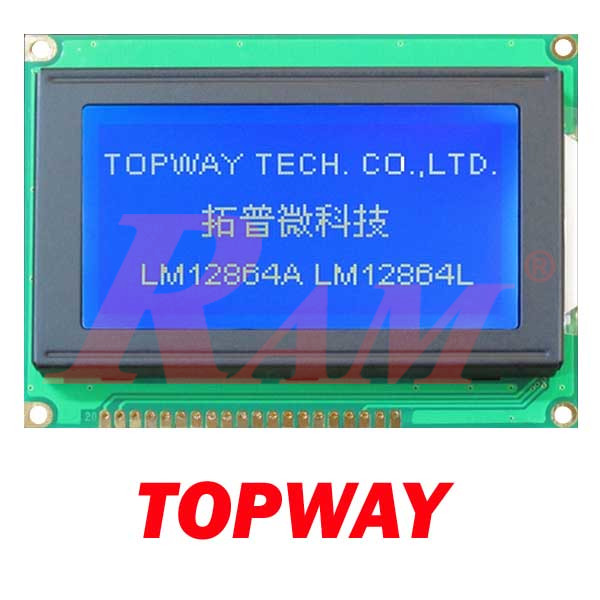
Graphical LCD 128x64 TOPWAY
LM12864LFW 12864
Controller S6B0107/S6B0108
مرجع داخلي:
LM12864LFW
TOPWAY LM12864LFW 128x64 Graphic LCD Module
Product Description
The TOPWAY LM12864LFW is a high-performance STN, Negative, Transmissive graphic LCD module boasting a 128x64 pixel resolution. It delivers excellent visual clarity by displaying light gray active data against a deep blue background. Illuminated by a bright white LED backlight and equipped with built-in S6B0107/S6B0108 equivalent controllers, this LCD screen provides reliable graphic output for various electronics projects, industrial interfaces, and embedded systems.
Key Features
- 128x64 pixel graphic display resolution.
- STN Negative Transmissive display mode with a 6 o'clock (6H) viewing angle.
- High-contrast color scheme: light gray display data on a deep blue background.
- Integrated white LED backlight circuit powered by 4 LEDs.
- Built-in power booster circuit for generating LCD driving voltage (VOUT).
- Environmentally safe and RoHS compliant.
Technical Specifications
| Specification | Value |
| Operating Voltage (VDD) | 5.0V (Typical) / 4.8V - 5.2V (Range) |
| Operating Current (IDD) | 6.5mA (Typical) / 15mA (Max) |
| Backlight Forward Voltage | 4.9V (Typical) |
| Backlight Current | 68mA - 80mA (Typical) / 120mA (Max) |
| Outline Dimensions | 93.0 x 70.0 x 13.8 mm (MAX) |
| Duty & Bias | 1/64 duty, 1/9 bias |
| Operating Temperature | -20°C to 70°C |
| Storage Temperature | -30°C to 80°C |
Operating Instructions / How to Use
- Adjust Display Contrast: You must connect an external 25k to 50k Variable-Resistor (VR) to the module to control the contrast. Connect this resistor between the VDD, VO, and VOUT pins to provide a reference voltage to VO.
- Hardware Reset: Initialize the LCD module by setting the /RST terminal to a low logic level when turning the power on. Keep the /RST pin low for a minimum reset time of 2.0us before raising it to a high state for normal running.
- Basic Software Setup: To drive the LCD module correctly and ensure a normal display, issue the following instructions to both controllers at startup: set "Display start line (Z address) = 0" and "LCD Display = on".
- Data Access: Note that the 128 columns are split into two sections. Use the CS1 pin (CS1=1) to enable access to the left side (first 64 columns) and the CS2 pin (CS2=1) to enable access to the right side (last 64 columns).
- Cleaning: Only clean the LCD panel with Isopropyl Alcohol or Ethyl Alcohol, as other solvents like water may cause damage.
Safety Notes & Warnings
- The LCD panel is made of glass; any mechanical shock, such as dropping it from a high place, will damage the module.
- Do not apply excessive force to the surface of the display, as this may cause the display color to change abnormally.
- The LCD polarizer is easily scratched; do not remove the protective film until the final step of your installation.
- The LCD module can be easily damaged by static electricity; be sure to maintain an optimum anti-static work environment to protect the device.
- Never operate the LCD module in conditions that exceed the absolute maximum ratings (such as applying more than 7.0V to VDD), as this may cause substantial damage.
- Avoid storing the module in direct sunlight, high humidity, or extreme temperatures, which can degrade the module's reliability.
Download
- For Arduino Code, please download this file (Click Here)
- Datasheet