



For best performance, confirm compatibility
with your vehicle via your car the service center or dealer.
نوصي قبل الشراء وللحصول على أفضل أداء، التأكد من توافق سيارتك مع الجهاز من خلال مركز الخدمة أو الوكيل المعتمد لموديل سيارتك.
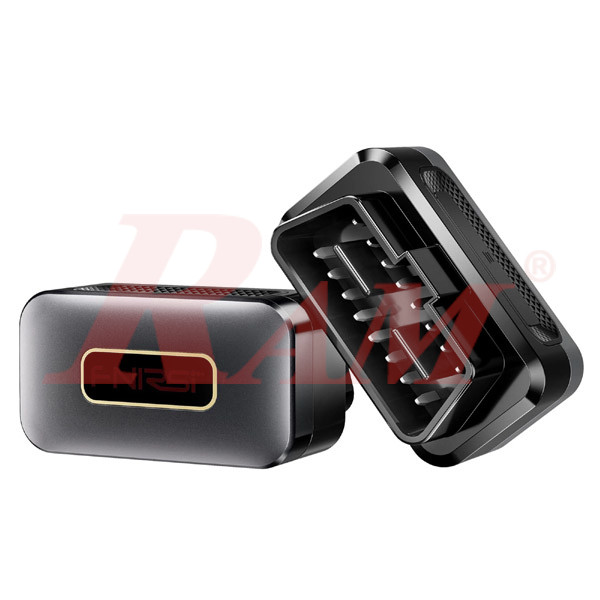
FNIRSI® FD10 Car OBD2 Scanner Clear Error OBD Diagnostic Tool
Product Description
The FNIRSI® FD10 is a compact Bluetooth 5.1 OBD2 diagnostic scanner designed to connect a vehicle's OBD2 system to an Android or iOS smartphone or tablet. It allows users to read vehicle diagnostic trouble codes (DTCs), perform vehicle fault diagnosis, and monitor available vehicle data through a dedicated mobile application.
Supporting major OBD2 communication protocols, including ISO15765-4 CAN, SAE J1850 PWM/VPW, and ISO9141-2, the FD10 is compatible with most vehicles manufactured after 1996 that support OBD2.
The scanner features plug-and-play operation, automatic vehicle adaptation, and a compact design for convenient installation in the vehicle's OBD2 diagnostic port. Through the YMOBD application, users can access vehicle information and monitor available live data, such as coolant temperature, vehicle speed, engine RPM, and battery voltage.
With Bluetooth 5.1 connectivity, support for eight languages, and low power consumption of up to 1W, the FNIRSI FD10 is a practical diagnostic tool for vehicle owners, automotive technicians, and DIY users.
Key Features
- Bluetooth 5.1 Connectivity: Provides wireless communication between the OBD2 scanner and compatible Android or iOS devices.
- OBD2 Vehicle Diagnostics: Reads diagnostic trouble codes (DTCs) to help identify vehicle faults.
- Clear Error Diagnostic Tool: Designed for vehicle fault diagnosis and OBD2 error-code management.
- Wide OBD2 Protocol Support: Supports ISO15765-4 CAN, SAE J1850 PWM, SAE J1850 VPW, and ISO9141-2 protocols.
- Broad Vehicle Compatibility: Compatible with most OBD2-equipped vehicles manufactured after 1996.
- 360° Full-Vehicle Scanning: Supports the manufacturer's advertised full-vehicle scanning function.
- Fast DTC Reading: Provides fast diagnostic trouble-code reading.
- Automatic Vehicle Adaptation: Intelligently adapts to different vehicle models.
- Live Vehicle Data: Allows monitoring of available vehicle parameters through the mobile application.
- Android and iOS Compatibility: Works with smartphones and tablets running supported Android or iOS systems.
- Eight Language Options: Supports multiple interface languages.
- Low Power Consumption: Power consumption of ≤1W.
- Wide DC Input Voltage: Supports an input voltage range of 8V–28V.
- Compact Design: Small and lightweight for convenient installation and storage.
Technical Specifications
| Parameter | Specification |
|---|---|
| Model | FD10 |
| Device Type | Bluetooth OBD2 Diagnostic Scanner |
| Bluetooth Version | Bluetooth 5.1 |
| Mobile Compatibility | Android / iOS |
| Application | YMOBD |
| OBD2 Protocols | ISO15765-4 CAN, SAE J1850 PWM, SAE J1850 VPW, ISO9141-2 |
| Vehicle Compatibility | Most OBD2 vehicles manufactured after 1996 |
| Vehicle Bus Systems | CAN_BUS / K_LINE / L_LINE |
| Diagnostic Function | DTC Reading and Vehicle Fault Diagnosis |
| Scanning Function | 360° Full-Vehicle Scanning (manufacturer description) |
| Language Support | 8 Languages |
| DC Input Voltage | 8V–28V |
| Power Consumption | ≤1W |
| Operating Temperature | -40°C to +85°C |
| Dimensions | Approx. 10 × 10 × 10cm |
| Weight | Approx. 100g |
Applications
- Vehicle Fault Diagnosis: Reading OBD2 diagnostic trouble codes to help identify vehicle faults.
- Check Engine Light Investigation: Connecting to the vehicle's diagnostic system to retrieve available fault codes.
- Live Data Monitoring: Viewing available vehicle parameters such as coolant temperature, engine RPM, vehicle speed, and battery voltage.
- Automotive Workshops: Supporting basic OBD2 diagnostic checks during vehicle inspection and troubleshooting.
- Personal Vehicle Maintenance: Helping vehicle owners check diagnostic information using a smartphone.
- Automotive DIY Projects: Providing convenient access to supported OBD2 vehicle data.
Installation and Operation
- Connect the Scanner: Insert the FNIRSI FD10 into the vehicle's OBD2 diagnostic port. In most vehicles, this port is located underneath the steering wheel.
- Install the Application: Scan the QR code supplied with the device to download the official YMOBD application.
- Start the Vehicle Ignition: Turn on the vehicle's ignition. The application will automatically connect to the scanner.
- Access Vehicle Data: Once connected, use the application to view available diagnostic information and vehicle data.
Package Contents
The supplied usage guide does not specify a complete package-content list. Please refer to the actual product package configuration for included accessories.
Frequently Asked Questions (FAQ)
1. What is the FNIRSI FD10 used for?
The FNIRSI FD10 is a Bluetooth OBD2 diagnostic scanner used to connect a vehicle's OBD2 system to a smartphone for reading diagnostic trouble codes and accessing supported vehicle data.
2. Is the FNIRSI FD10 compatible with Android and iOS?
Yes. The FD10 supports both Android and iOS devices through Bluetooth 5.1 connectivity and the dedicated YMOBD application.
3. Which vehicles are compatible with the FD10?
The manufacturer states that the FD10 is compatible with most OBD2-equipped vehicles manufactured after 1996. Compatibility depends on the vehicle's supported OBD2 protocols and diagnostic functions.
4. Which OBD2 communication protocols does it support?
The FD10 supports ISO15765-4 CAN, SAE J1850 PWM, SAE J1850 VPW, and ISO9141-2 protocols. It also supports CAN_BUS, K_LINE, and L_LINE vehicle bus systems.
5. Does the FD10 support diagnostic trouble-code reading?
Yes. The FD10 supports DTC reading, allowing users to retrieve available diagnostic trouble codes through the mobile application.
6. What vehicle information can be monitored through the application?
The application can display available live vehicle data. Examples shown in the supplied usage guide include coolant temperature, vehicle speed, engine RPM, and battery voltage. The available parameters depend on the vehicle.
7. How do I connect the FD10 to my smartphone?
Insert the scanner into the vehicle's OBD2 port, install the YMOBD application using the supplied QR code, and turn on the vehicle's ignition. The application is described as connecting automatically.
8. Does the FD10 require a separate power adapter or battery?
The FD10 receives power through the vehicle's OBD2 diagnostic connection. Its specified DC input voltage is 8V–28V, and its power consumption is ≤1W.
Download: