Picking the wrong Raspberry Pi camera module can mean blurry shots, a project that never gets past testing, or paying for AI features you'll never use. With options ranging from an affordable ESP32-based board to a Sony AI vision sensor, the right choice depends entirely on what you're building.
This guide compares 5 camera modules available at RAM Electronics — by resolution, AI capability, board compatibility, and price — so you can pick the right one the first time.
Ready to shop the full range? Browse the Audio, Sound & Camera Modules collection
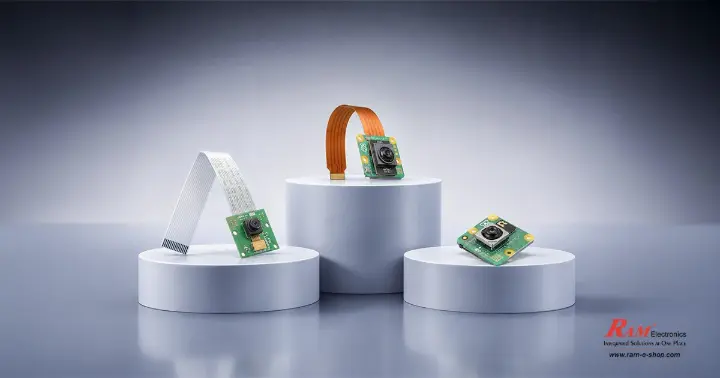
How to Choose the Right Camera Module
Before comparing individual products, it helps to narrow things down by three simple questions.
Resolution — Do You Need 5MP or 12MP?
For basic monitoring, motion detection, or simple robotics vision, a 5MP camera is usually enough and keeps costs down. If your project involves detailed image capture, close-up work, or you want sharper video for streaming or documentation, a 12MP module with autofocus is the better investment.
As a rule of thumb, resolution matters most when a human will be looking closely at the footage — for automated detection tasks handled by software, a lower-resolution sensor is often perfectly capable and saves you money that's better spent elsewhere in the build.
Do You Need On-Device AI Processing?
Standard camera modules simply capture images and send them to your board's processor for any analysis. AI-capable cameras handle detection and recognition directly on the camera itself, which frees up your board's CPU.
This matters most for real-time applications like object counting or face detection, where processing speed is critical. If you're just capturing images or streaming video without running detection models, this feature adds cost without adding value to your project.
Raspberry Pi vs. ESP32 — Which Board Are You Using?
Raspberry Pi camera modules connect through a dedicated CSI ribbon cable and require a Raspberry Pi board.
ESP32-based camera boards are self-contained, combining the processor, Wi-Fi, and camera in one unit — a good fit for simple, low-cost, standalone builds where you don't already own a Raspberry Pi.
If you already have a Raspberry Pi sitting on your desk, a CSI camera module will almost always be the more capable and better-supported choice.
Comparison Table — All 5 Camera Modules at a Glance
|
Module |
Resolution |
Best For |
Board / Cable |
Price |
|
Ai Thinker AiPi-CAM-D200 |
- |
Budget ESP32-CAM projects |
ESP32-compatible, Wi-Fi & Bluetooth |
850 EGP |
|
RPi 3B/4B Camera 5MP |
5MP |
Cheapest entry point |
Raspberry Pi 3B/4B, 15-pin cable included |
275 EGP |
|
RPi 5 Camera 5MP |
5MP |
Raspberry Pi 5 builds |
Raspberry Pi 5, 22-pin cable included |
450 EGP |
|
RPi Camera Module V3 |
12MP |
Best all-around / autofocus |
15-pin cable included |
4,500 EGP |
|
RPi AI Camera (IMX500) |
12.3MP |
On-device AI / real-time detection |
22-pin cable included |
7,850 EGP |
Ai Thinker AiPi-CAM-D200 — Best Budget ESP32 Camera
For readers working with an ESP32-CAM setup, the Ai Thinker AiPi-CAM-D200 Camera Core Development Board is the most accessible starting point in this lineup. It's built around the Ai-M61-32S processor module, is compatible with ESP32-CAM setups, and includes both Wi-Fi and Bluetooth connectivity — priced at 850 EGP.
This board suits standalone projects like a simple Wi-Fi security camera, a doorbell camera, or a low-cost vision module for a robotics project where you don't need a separate Raspberry Pi.
Pair it with a compatible development board from our Development Board (Open Source) category if your project needs additional processing power or extra I/O.
Raspberry Pi 3B/4B Camera Module 5MP — Most Affordable Raspberry Pi Option
The Raspberry Pi 3B/4B Camera Module 5MP (Rev 1.3) is the most budget-friendly way to add a camera to an existing Raspberry Pi 3B or 4B setup, at 275 EGP. It ships with a 15-pin ribbon cable, so it's ready to connect straight to your board's camera port.
If your project is a first-time camera build, a learning exercise, or a simple monitoring setup where 5MP resolution is enough, this is the lowest-cost way to get started.
Raspberry Pi 5 Camera Module 5MP — Built for the Latest Raspberry Pi 5
If you're working with the newer Raspberry Pi 5, the Raspberry Pi 5 Camera Module 5MP (450 EGP) includes the correct 22-pin ribbon cable for that board's camera port, avoiding the adapter cable confusion that catches out a lot of first-time Pi 5 builders.
It's a straightforward 5MP option for anyone who wants a reliable, no-frills camera specifically matched to Raspberry Pi 5 hardware.
Raspberry Pi Camera Module V3 (12MP Autofocus) — Best All-Around Choice
The Raspberry Pi Camera Module V3 is the official 12MP module built around the Sony IMX708 sensor, with autofocus — a meaningful upgrade over fixed-focus 5MP modules for anyone who needs sharper detail or is shooting subjects at varying distances. It's priced at 4,500 EGP and includes a 15-pin ribbon cable.
This is the module to choose for general-purpose projects where image quality genuinely matters: documentation, wildlife or time-lapse projects, or any build where blurry, fixed-focus shots would be a real limitation.
Raspberry Pi AI Camera (Sony IMX500) — Best for On-Device AI
The Raspberry Pi AI Camera is built around Sony's IMX500 intelligent vision sensor — a 12.3MP camera with on-sensor AI processing, meaning it can run detection models directly on the camera itself rather than relying entirely on the Raspberry Pi's own CPU. It's the premium option in this lineup at 7,850 EGP and includes a 22-pin ribbon cable.
Consider this raspberry pi ai camera specifically if your project needs real-time object or face detection and you want to keep your Pi's processor free for other tasks — for simpler projects, a standard camera paired with software-based detection is usually enough.
Quick Picks: Which Module Fits Your Project?
If you'd rather skip straight to a recommendation, here's a quick summary based on the most common project types:
Just getting started with your first camera project: go with the Raspberry Pi 3B/4B Camera Module 5MP — it's the cheapest way to learn without overcommitting.
Building on a Raspberry Pi 5: choose the Raspberry Pi 5 Camera Module 5MP so you get the correct cable out of the box.
Want the sharpest general-purpose photos or video: the Raspberry Pi Camera Module V3 with autofocus is worth the upgrade.
Running real-time detection (people, objects, faces): the Raspberry Pi AI Camera handles it on-sensor, without slowing down your Pi.
Don't have a Raspberry Pi and want a self-contained camera: the Ai Thinker AiPi-CAM-D200 gets you a working Wi-Fi camera without any additional board.
Why Buy Your Camera Module from RAM Electronics
RAM Electronics has been supplying electronic components and development boards in Egypt since 2003, with a catalog of over 3,000 products spanning development boards, sensors, and measuring instruments alongside camera and audio modules.
Orders can be picked up directly from the RAM store or shipped nationwide within 2-3 business days, with multiple payment options available at checkout.
Frequently Asked Questions
What's the difference between the ESP32-CAM setup and a Raspberry Pi camera module?
An ESP32-based camera board like the AiPi-CAM-D200 is a standalone unit with its own processor and Wi-Fi built in, ideal for simple, low-cost projects.
Raspberry Pi camera modules require a separate Raspberry Pi board but connect via a dedicated CSI ribbon cable and generally offer higher resolution and broader software support.
Do I need the Raspberry Pi AI Camera for a computer vision project?
Not necessarily. You can run computer vision software on a standard camera module using the Raspberry Pi's own processor. The AI Camera is worth the extra cost mainly when you need real-time, on-sensor detection without loading down your Pi's CPU.
Can I use the Raspberry Pi Camera Module V3 on an older board originally set up for the Raspberry Pi Camera Module v1?
Camera modules connect via a ribbon cable, and older boards may use a different cable size than newer ones. Check which port your specific Raspberry Pi model uses before ordering, so you get a module with the matching cable type.
Do you carry a Pi NoIR (infrared/night vision) version of the Camera Module 3?
Our current listing is the standard Raspberry Pi Camera Module V3. If your project specifically needs infrared/night-vision capability, contact our sales team to check current availability before ordering.
Which camera module is best for a beginner's first Raspberry Pi project?
The Raspberry Pi 3B/4B Camera Module 5MP is the simplest and least expensive way to get started if you're already working with a Pi 3B or 4B. If you want a bit more image quality headroom without jumping straight to the premium options, the Camera Module V3 is a solid step up.
Found the right camera for your build? Shop the Raspberry Pi Camera Module V3 now or explore the full range in our Audio, Sound & Camera Modules collection for more options across every budget.