Every breadboard listing shows a number — 170, 400, 830, 1660 — and it's rarely explained. That number is the tie point count, and it's the single most useful spec for deciding whether a breadboard actually fits your project. Here's what it means and how to pick the right size.
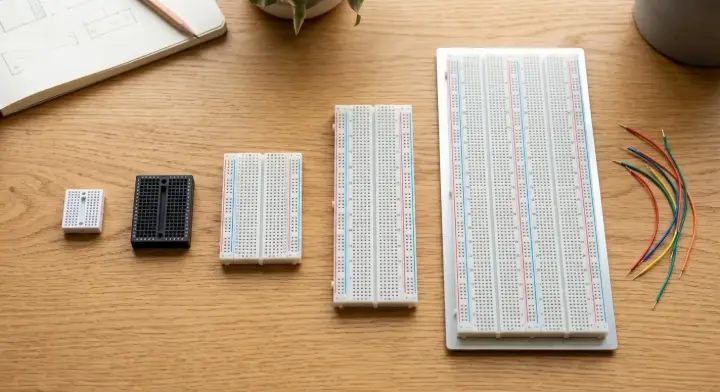
What Does "Tie Point" Actually Mean?
A tie point is one hole on the breadboard that's electrically connected to a small group of other holes underneath the surface — usually 5 in a row on the terminal strips. More tie points simply means more room to place components and make connections before you run out of space.
Breadboards are generally made of two parts:
- Terminal strips — the main rows in the middle, where you plug in components like resistors and ICs.
- Distribution strips — the two rails running along the top and bottom (usually marked + and −), used for power and ground.
Breadboard Sizes Compared
Model | Tie Points | Layout | Best For |
25 | 1 terminal strip only | Testing a single connection or component lead | |
170 | Compact single strip | Small microcontroller add-ons, tight enclosures | |
400 | 1 terminal strip (300) + 2 distribution strips (100) | Small-to-medium circuits, 1–2 ICs | |
830 | 1 terminal strip (630) + 2 distribution strips (200) | Standard student/lab circuits — the most common size | |
1660 | 2 terminal strips (1260) + 4 distribution strips (400) | Larger multi-IC builds, robotics, bigger class projects |
All of the above use standard 2.54mm pitch spacing and accept 20–29AWG wire — the same wire gauge as most jumper wire kits, so you don't need to think about compatibility.
Which Size Should You Buy?
- For most first-semester coursework (a handful of LEDs, resistors, a sensor, maybe one IC), an 830 tie point breadboard like the BB-01 is the standard choice — enough room without being bulky.
- For a quick single test — checking one connection, one LED, one sensor lead — a small board like the XF-25 or BB-601 is cheaper and takes up less desk space.
- For bigger builds (multiple ICs, robotics projects, anything that outgrows a single board), the 1660-point BB-2T3D gives you the most room in a single unit.
Can You Connect Two Breadboards Together?
Yes. Both the BB-801 and BB-01 are built so the same model can be connected side-by-side with another unit of itself to extend the workspace — useful if a project outgrows one board mid-semester without needing to buy a completely different (and more expensive) size.
Frequently Asked Questions
Do I need a full-size breadboard for my first electronics course?
- For most intro courses, yes — an 830 tie point board (like the BB-01) is the standard size used across most lab exercises.
- A smaller board works fine if your course only covers a handful of simple circuits, but you'll likely outgrow it by the second project.
What's the difference between terminal strips and distribution strips?
- Terminal strips (the main middle rows) are where components and ICs go.
- Distribution strips (the top/bottom rails) are dedicated to power and ground, so you don't need to run a wire from every component back to the power source individually.
Can I use a mini breadboard for an Arduino project?
- Yes, for small sensor circuits — but most Arduino tutorials assume a full-size board, since they often use several jumper wires and components at once.
- If you're following along with a specific tutorial, match the tie point count it assumes to avoid layout surprises.
Does breadboard size affect wire compatibility?
- No — all the sizes above use the same 2.54mm pitch and accept the same 20–29AWG wire range, so any jumper wire kit works across every size on this list.
Ready to Pick Your Breadboard?
Whether you need a quick test board or a full lab-size breadboard, RAM Electronics carries the full range — from a 25-point tester to a 1660-point board for bigger builds. Pair it with our Back-to-University Electronics Kit for the rest of what you'll need this semester.