Arduino UNO vs Mega2560 is one of the most common questions once you've built a few projects and started hitting the edges of your board.
They run the same code and use the same Arduino IDE, so the choice isn't about power — it's about room. The Mega2560 simply has far more pins, memory, and serial ports than the UNO.
This guide compares the two head-to-head and shows exactly when the UNO is enough and when you genuinely need the Mega.
for learning, prototyping, and most projects with a handful of sensors, the Arduino UNO is all you need. Choose the Mega2560 when you run out of pins, need several serial devices at once, or write programs too big for the UNO's memory.
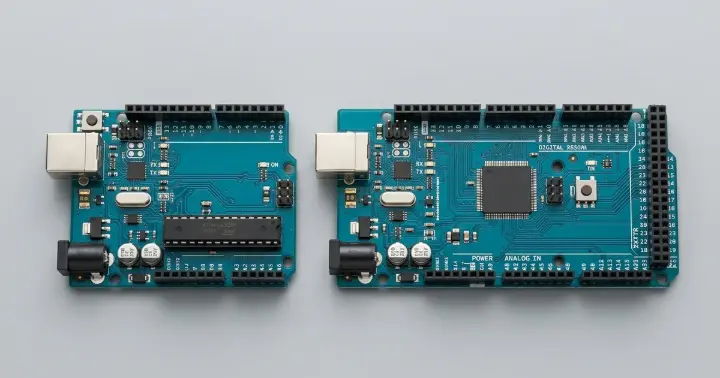
Arduino UNO vs Mega2560: Side by Side
Spec | Arduino UNO | Arduino Mega2560 |
Microcontroller | ATmega328 | ATmega2560 |
Clock speed | 16 MHz | 16 MHz |
Digital I/O pins | 14 (6 PWM) | 54 (15 PWM) |
Analog inputs | 6 | 16 |
Hardware serial (UART) | 1 | 4 |
Flash memory | 32 KB | 256 KB |
SRAM | 2 KB | 8 KB |
EEPROM | 1 KB | 4 KB |
Operating voltage | 5V | 5V |
Same speed, same voltage, same programming — the only difference is how much: how many pins, how much memory, how many serial ports.
What the Numbers Actually Mean
Specs only help if you know what they do in a real build. Here is how each difference plays out.
Digital pins (14 vs 54). Every sensor, button, LED, motor driver, and display uses pins. The UNO is fine for a small build, but a big LED matrix, many relays, or several motor drivers will run it out of pins fast. The Mega gives you room to connect a wall of devices.
Hardware serial ports (1 vs 4). This is the Mega's quiet superpower. The UNO's single UART also clashes with USB programming, so running even one serial device can be awkward. The Mega's four UARTs let you run a GPS, a Bluetooth module, and a serial sensor at the same time, reliably.
Flash memory (32 KB vs 256 KB). Your program lives here. Heavy libraries — GPS parsing, graphics, several sensor libraries together — fill the UNO quickly. The Mega has eight times the space.
SRAM (2 KB vs 8 KB). This holds your variables and buffers while the program runs. Large arrays, long strings, and display buffers can exhaust the UNO's 2 KB and cause random crashes. The Mega's 8 KB is far more forgiving.
Analog inputs (6 vs 16). More room for voltage-output sensors and potentiometers without adding extra hardware.
A Real Example: Running Two Serial Devices
Say you're building a tracker that reads GPS location and sends it out over a Bluetooth module. Both talk over serial.
On the UNO, with only one hardware UART, the two devices compete for the same port. You end up juggling a fragile "software serial" workaround, and reliability suffers.
On the Mega2560, you wire the GPS to one UART and Bluetooth to another. Both run at full speed, at the same time, with no tricks.
That single difference is reason enough to choose the Mega for serial-heavy projects.
When the Arduino UNO Is Enough
For most people, most of the time, the Arduino UNO is the right pick:
- You're learning Arduino or prototyping an idea.
- Your project uses a few sensors and outputs.
- You're following tutorials or using starter shields — almost all are written for the UNO.
- You want a smaller, cheaper board that fits tight enclosures.
When You Need the Mega2560
Reach for the Arduino Mega2560 when the UNO starts getting in your way:
- You've run out of digital or analog pins.
- You need two or more serial devices working at once (for example GPS + Bluetooth).
- Your program or libraries won't fit in 32 KB of flash, or you're hitting the 2 KB SRAM limit.
- You're building something big: a 3D printer controller, a large LED installation, or a rig with many motors and relays.
Can You Use UNO Shields on the Mega2560?
Most UNO-format shields physically fit the Mega, because the header layout matches along the UNO section of the board.
Just check two things first:
- Pin mapping. Some SPI and I2C pins sit on different physical pins on the Mega, so a shield that hard-codes those pins may need adjusting.
- Library support. Make sure the shield's library supports the Mega — most popular ones do.
When in doubt, check the shield's documentation before you buy.
A Note on Compatible Boards
Both boards at RAM are described as compatible boards built with original ATmega and USB chips, rather than official Arduino-branded boards.
For learning and projects they behave exactly like the genuine boards: they run the same sketches, use the same Arduino IDE, and carry the same pins and memory.
Frequently Asked Questions
What's the main difference between Arduino UNO and Mega2560?
The Mega2560 has far more of everything — 54 digital pins versus 14, 16 analog inputs versus 6, four hardware serial ports versus one, and eight times the flash memory. The UNO is smaller and simpler; the Mega is for bigger, pin-hungry projects.
Is the Mega2560 faster than the UNO?
No. Both run at 16 MHz, so raw speed is the same. The Mega gives you more pins, memory, and serial ports — not more speed.
Should a beginner start with the UNO or the Mega2560?
The UNO. Almost every tutorial and starter shield is written for it, it's simpler to wire, and it covers the vast majority of first projects. Move to the Mega only when you hit a real limit.
Can I run UNO code on the Mega2560?
Usually yes. The same sketches and the same Arduino IDE work on both. You may just need to adjust pin numbers if your code relies on specific pins that differ between the boards.
When do I actually need a Mega2560?
When you run out of pins, need more than one serial device at the same time, or your program is too big for the UNO's memory. A classic example is a 3D printer controller, which leans on the Mega's extra pins and memory.
UNO or Mega: The Bottom Line
Arduino UNO vs Mega2560 comes down to one question: have you run out of room? For learning and most projects, the UNO is the right, simpler choice. The moment you need more pins, more serial ports, or more memory, the Mega2560 is the upgrade.
Pick the UNO to start, and reach for the Mega when a real project demands it.
Ready to choose? Get the Arduino UNO or the Arduino Mega2560, or browse all Arduino boards and accessories at RAM Electronics.