A 6-DOF robotic arm kit is one of the most exciting builds in hobby robotics. It moves much like a human arm, with six independent joints that let it rotate, reach, lift, and grip.
But before you buy one, the real question is: what can you actually build with it? This guide answers that with real project ideas, then shows exactly what you need to run the arm and whether it suits a beginner.
Everything here is framed for the light-duty, educational arm kits most makers start with — the kind driven by six hobby servos.
In short, these arms are built for learning and light handling. The most popular builds are:
- Pick-and-place — move small objects from one spot to another.
- Sorting — sort light items by color or size.
- Drawing and writing — hold a pen and trace shapes.
- Teaching motion and kinematics — learn how multi-joint movement works.
- Camera-on-arm — experiment with vision-guided movement.
Let's look at each, then at what you need to make it move.
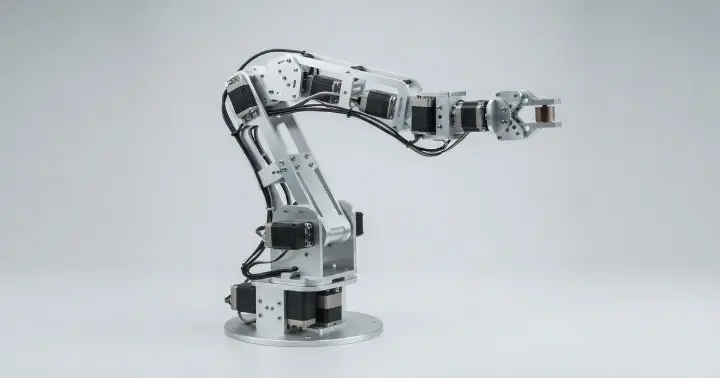
What Is a 6-DOF Robotic Arm?
"6-DOF" means six degrees of freedom — six independent movements. On a typical arm kit, that's base rotation, shoulder, elbow, wrist tilt, wrist rotation, and the gripper.
Each joint is driven by its own servo motor, so the arm can reach a point in space from different angles, much like your own arm and hand.
The 6-DOF aluminum robotic arm kit at RAM is an all-metal design: six MG996R metal-gear servos, 2 mm aluminum brackets, and ball bearings at the joints for smooth, accurate movement.
What You Can Build With It
All of these work best with light objects — the arm is built for learning and demonstration, not heavy lifting.
Pick-and-Place
The classic first project: program the arm to pick up a small object from one spot and place it in another.
It teaches you how to coordinate all six joints into a single smooth motion, and it's the base for almost everything else.
Sorting Light Objects
Add a color sensor or a camera, and the arm can sort small items — by color, shape, or size — into different bins.
It's a great introduction to combining sensing with movement.
Drawing and Writing
Fit a pen or marker into the gripper and the arm becomes a simple plotter, tracing letters, shapes, or signatures on paper.
It's a satisfying way to see how precise your motion control really is.
Teaching Motion and Kinematics
A multi-joint arm is the perfect hands-on tool for learning how robotic motion works — forward and inverse kinematics, joint angles, and reach.
That is exactly why these kits are so popular in schools and robotics training.
Camera-on-Arm Vision Experiments
Mount a small camera on the wrist and you can experiment with vision-guided movement — following an object or lining up a grab.
It's an entry point into the computer-vision side of robotics.
Repeatable Automation Demos
Program a fixed sequence — reach, grip, lift, place, return — and the arm repeats it on a loop, like a tiny assembly line.
It's a clear, visual way to show how industrial robots automate repetitive tasks.
What You Need to Control It
The arm is sold as the mechanical kit — the structure and the servos. To actually make it move, you add three things:
- A controller. The six servos use standard PWM signals, so an Arduino UNO is the usual choice and the easiest way to start.
- A servo driver. Driving six servos cleanly is a job for a dedicated board like the PCA9685 16-channel servo driver. It controls all the servos over a simple I2C connection and keeps your wiring tidy.
- A separate power supply. This is the step beginners miss: six MG996R servos together draw far more current than an Arduino's 5V pin can give. Powering them from the board causes brown-outs and resets, so use a dedicated supply of around 5–6V rated for several amps.
If a servo ever wears out, the arm uses standard MG996R metal-gear servos, so replacements are easy to find.
Is It Right for Beginners?
Yes — with realistic expectations.
The arm ships as a kit, so assembly is required, but a build video is provided to guide you. Plan for a patient afternoon and a lot of small screws.
On the software side, controlling servos with an Arduino is beginner-friendly, and there are many example sketches to start from. The real challenge — and the fun — is coordinating all six joints into one smooth motion.
If this is your very first robotics project, get one or two joints moving on their own before you run the whole arm.
Tips for a Smooth First Build
A few habits save a lot of frustration before you run the whole arm:
- Power the servos separately from day one. Give the servos their own supply, not the Arduino — it's the biggest cause of random resets.
- Test one joint at a time. Confirm each servo moves correctly before you combine all six.
- Find each joint's safe range. Servos can strain against the frame, so locate the limits and keep your code inside them.
- Move slowly at first. Slow, smooth motion is easier to debug and gentler on the gears.
Frequently Asked Questions
How many servos does a 6-DOF robotic arm use?
Six — one for each degree of freedom. This kit uses six MG996R metal-gear servos, covering base rotation, shoulder, elbow, wrist, and the gripper.
What do I need to control the arm?
Three things beyond the kit: a controller like an Arduino UNO, a PCA9685 servo driver to drive all six servos, and a separate 5–6V power supply rated for several amps. Don't power the servos from the Arduino itself.
Is a 6-DOF robotic arm good for beginners?
Yes, as long as you expect to assemble it and learn gradually. The servos use simple PWM control with plenty of example code, and a build video is included. These kits are widely used for school and training projects.
Does the arm come assembled?
No. It is supplied as a kit with the aluminum structure and servos, and you assemble it yourself using the provided build video.
What can the arm lift?
It is designed for light objects — the kind you'd use in a pick-and-place or sorting demo. Treat it as a learning and demonstration platform rather than a heavy-duty industrial arm.
Can I control it with a Raspberry Pi instead of Arduino?
Yes, but a Raspberry Pi cannot drive the servos reliably on its own. Use it together with a PCA9685 servo driver and a separate power supply.
Start Building With a 6-DOF Arm
A 6-DOF robotic arm kit is one of the best ways to move from single-motor projects into real, multi-joint robotics — pick-and-place, sorting, drawing, and vision, all on one platform.
Add a controller, a servo driver, and a proper power supply, and you have a complete robotics learning station.
Ready to build? Get the 6-DOF aluminum robotic arm kit and the parts to drive it — the PCA9685 servo driver and an Arduino UNO — or browse all robotics parts and accessories at RAM Electronics.